Mon–Thu 09:30–17:00, Fri until 15:00

Bargteheide 04532 408 99 95Göttingen 0551 890 64 000

Plugin for Shopware 6

Preferred Delivery Date for Shopware 6

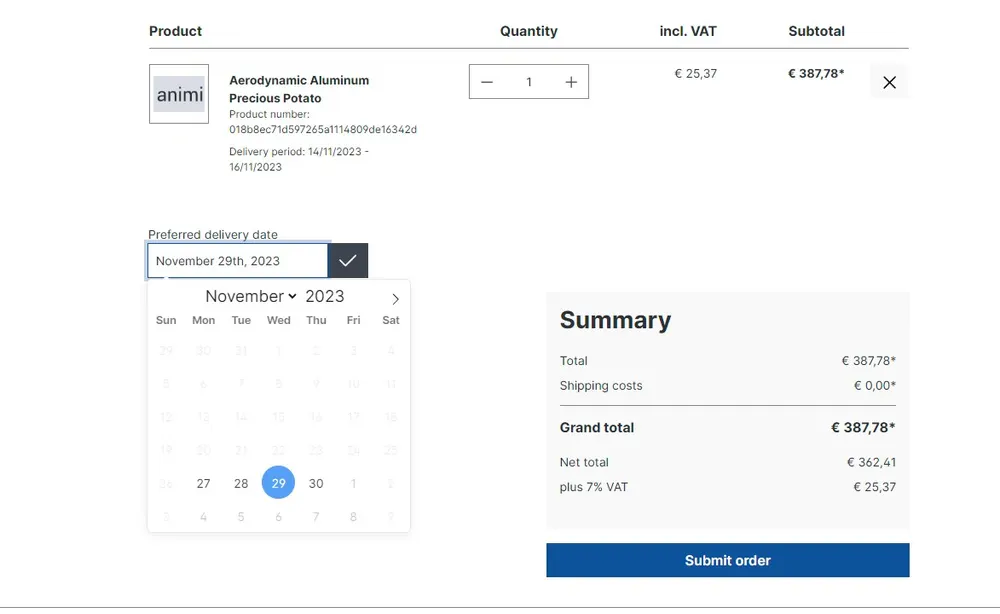
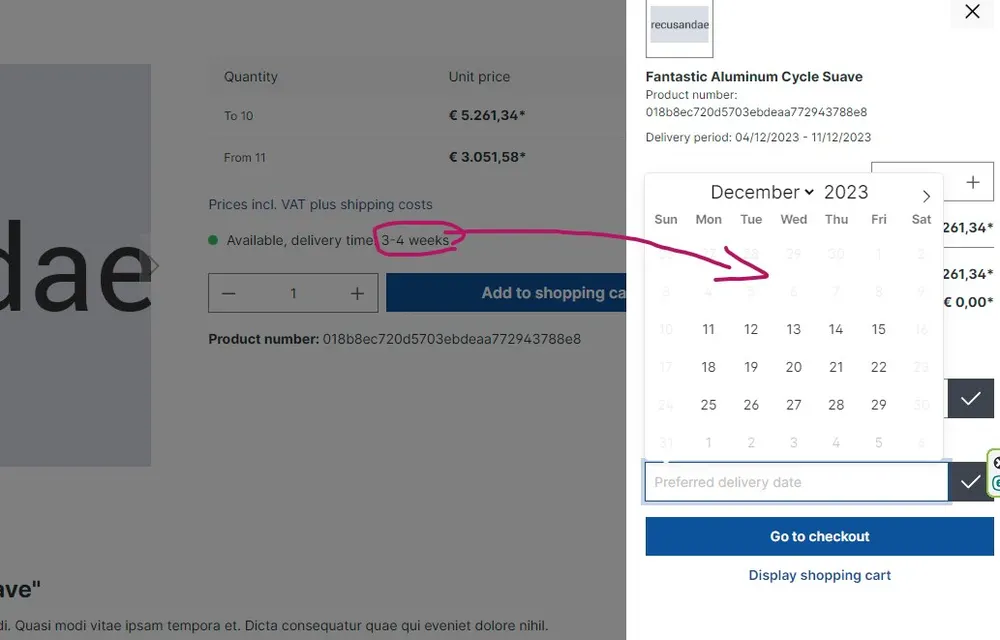
Customers choose their delivery date at checkout. The earliest day is based on delivery times, buffer, public holidays and your closing days.

Shopware 6 plugin Preferred Delivery Date by Web Labels: feature view

For larger deliveries, customers want a say in when the goods arrive. A free date field, however, leads to dates you cannot meet.

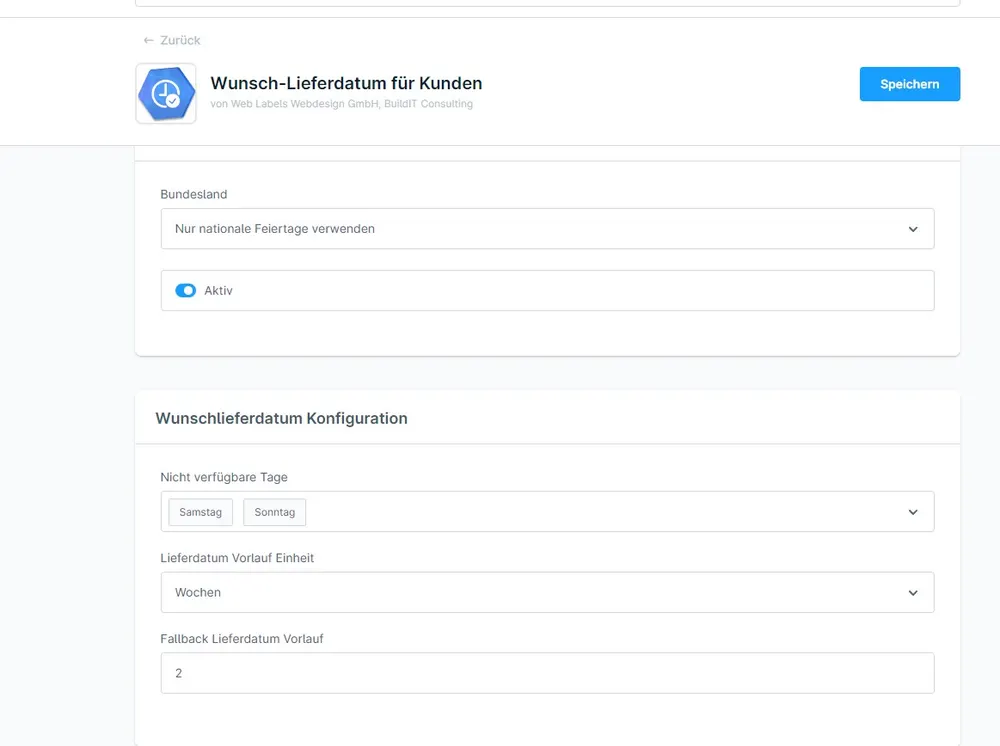
This plugin calculates the earliest possible delivery day from the delivery times in the cart, your lead time, public holidays and closing days. The calendar only offers days that are actually feasible. The chosen date is passed to the order, confirmation and documents.

What you can use the plugin for

  • Furniture, appliances, large items

    Customers schedule the delivery for when someone is at home.

  • Gifts and occasions

    Orders for a specific occasion arrive on the desired day.

What it looks like in the shop
Screenshot of Preferred Delivery Date for Shopware 6: view 1
Preferred Delivery Date: view 1
Screenshot of Preferred Delivery Date for Shopware 6: view 2
Preferred Delivery Date: view 2
Screenshot of Preferred Delivery Date for Shopware 6: view 3
Preferred Delivery Date: view 3

Set up in a few steps

  1. Install the plugin and set the buffer time.
  2. Configure public holidays and blocked weekdays.
  3. Check the delivery times on the products and place a test order.

Frequently asked questions about Preferred Delivery Date

How does the plugin know the delivery time?

It uses the delivery times you maintain on the products in Shopware. With several products, the longest one counts.

Where does my team see the preferred date?

In the order in the Administration, in the order confirmation and in the documents.

Your contacts

Questions about Preferred Delivery Date or need an adjustment?

Would you like to know whether the plugin suits your shop, or do you need an extension? Talk to us directly.

Janis Rittmeier and Tim Schröder, Key Account Manager at Web Labels, your contact for Preferred Delivery Date

Our team for your questions

  • René Grosche, Managing Director at Web Labels René Grosche Managing Director
  • Marco Kreutzfeldt, Deputy Managing Director · Back office at Web Labels Marco Kreutzfeldt Deputy Managing Director · Back office
  • Tim Schröder, Key Account Manager at Web Labels Tim Schröder Key Account Manager · Consulting and quotes
  • Janis Rittmeier, Key Account Manager at Web Labels Janis Rittmeier Key Account Manager · Consulting and quotes
  • Lennart Albrecht, Head of Development at Web Labels Lennart Albrecht Head of Development
  • Tom Baustian, Web design · Performance marketing · Audio at Web Labels Tom Baustian Web design · Performance marketing · Audio
  • Tajara-Tabea Leonard, Web design · Content · SEO at Web Labels Tajara-Tabea Leonard Web design · Content · SEO
  • Ken Raupach, Web design · Performance marketing at Web Labels Ken Raupach Web design · Performance marketing
  • Muhammed Tay, Web development at Web Labels Muhammed Tay Web development
  • Alexander Folz, Web development at Web Labels Alexander Folz Web development
  • Aaron Griem, Web development at Web Labels Aaron Griem Web development
  • Leon Fischer, Web development at Web Labels Leon Fischer Web development
  • Patrick Heidl, Web development at Web Labels Patrick Heidl Web development
  • Tobias Schäfer, Web development at Web Labels Tobias Schäfer Web development · Complex development
  • Laura Schop, Web development at Web Labels Laura Schop Web development
  • Aleksej Werestschagin Web development
  • Julina Sievert, Apprentice at Web Labels Julina Sievert Apprentice
  • Rosa-Lee Biesterfeldt, Apprentice at Web Labels Rosa-Lee Biesterfeldt Apprentice

Related plugins

  • Shopware 6 plugin Reference text field per line item by Web Labels: feature view

    Reference text field per line item

    Business customers add their own reference text to each product, for example for a project, branch or cost centre. Tiered prices still apply to the total quantity.

  • Shopware 6 plugin Shipping Costs per Parcel by Web Labels: view from the Shopware Store

    Shipping Costs per Parcel

    Shopware calculates how many parcels an order needs and charges shipping costs for each parcel.

  • Shopware 6 plugin Shopping Feed with Unique Discounts by Web Labels: feature view

    Shopping Feed with Unique Discounts

    Visitors from price comparison sites get the discount only on the product they came for. All other products keep their normal price.

Need an adjustment or an extension of your own?

Many of our plugins only exist because a client asked for them. If your shop needs something that is not listed here, we will develop the right plugin for you.

Up to 80% government funding